Pay Safari Acacia with Wise
This page explains, screen by screen, how to send your deposit or balance payment to Safari Acacia using Wise, once your booking has already been confirmed. It is here purely to make the transfer straightforward. If anything is unclear at any point, contact us directly rather than guessing.
About This Page
Wise is one of the payment methods listed on your invoice for settling your deposit or balance with Safari Acacia. It is an international money transfer service built around one core idea: showing you the real exchange rate and the exact fee before you send, so there are no surprises for either side. The steps below walk through sending a payment from start to finish, using the same screens you will see in the Wise app.
Prefer to pay another way? You can also settle your invoice through Revolut, see our Pay with Revolut guide.
Why Use Wise
Wise uses the real mid market exchange rate, the same rate you would see quoted on Google or Reuters, with no markup added. Its fee is a small fixed charge plus a low percentage of the amount sent, shown in full before you confirm, and there are no subscription tiers to unlock a better rate, every sender gets the same transparent pricing. Safari Acacia does not need a Wise account to receive your payment, only a regular bank account, which is what makes it a straightforward option for a one off transfer like a booking deposit. Wise is a regulated financial institution, and every transfer can be tracked from within the app until it arrives.
If You Do Not Already Use Wise
Setting up an account takes a few minutes. Download the app from the App Store or Google Play, or use the web version at wise.com. Sign up with your email and set a password, then verify your identity with a government issued ID, such as a passport, driving licence or national ID. Wise may also ask a few questions about the purpose of your account before your first transfer.
Once verified, you can fund a transfer directly at the time of sending, by card or bank debit, so there is no need to preload a balance before you begin. Identity verification can take anywhere from a few minutes to a day, so it is worth completing as soon as you sign up if your payment is due soon.
How to Send Your Payment
Once you are logged in and verified, sending your deposit or balance takes about five minutes.
Open Wise and Tap Send
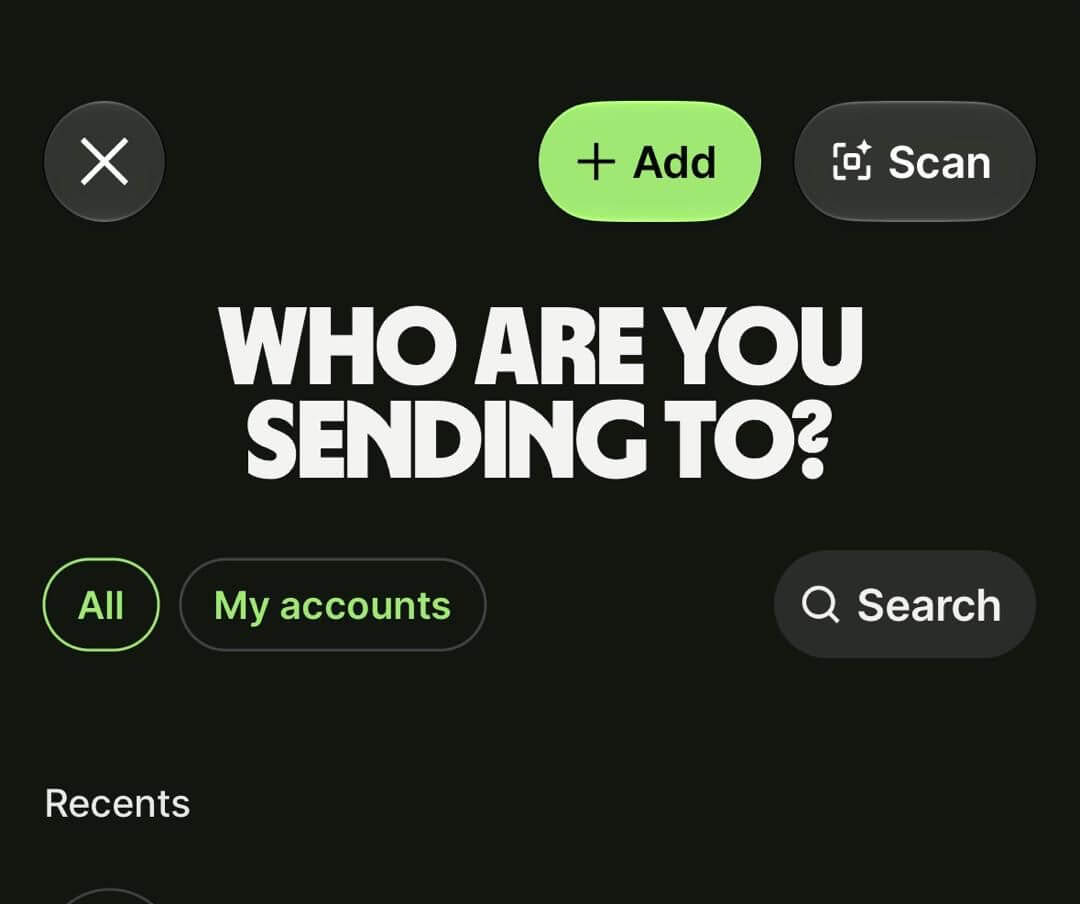
Log in to Wise and tap Send from the home screen. On the "Who are you sending to?" screen, tap the green Add button to create a new recipient. If you have paid Safari Acacia before, you can search your recent recipients instead.
Select Indian Rupee as Their Currency
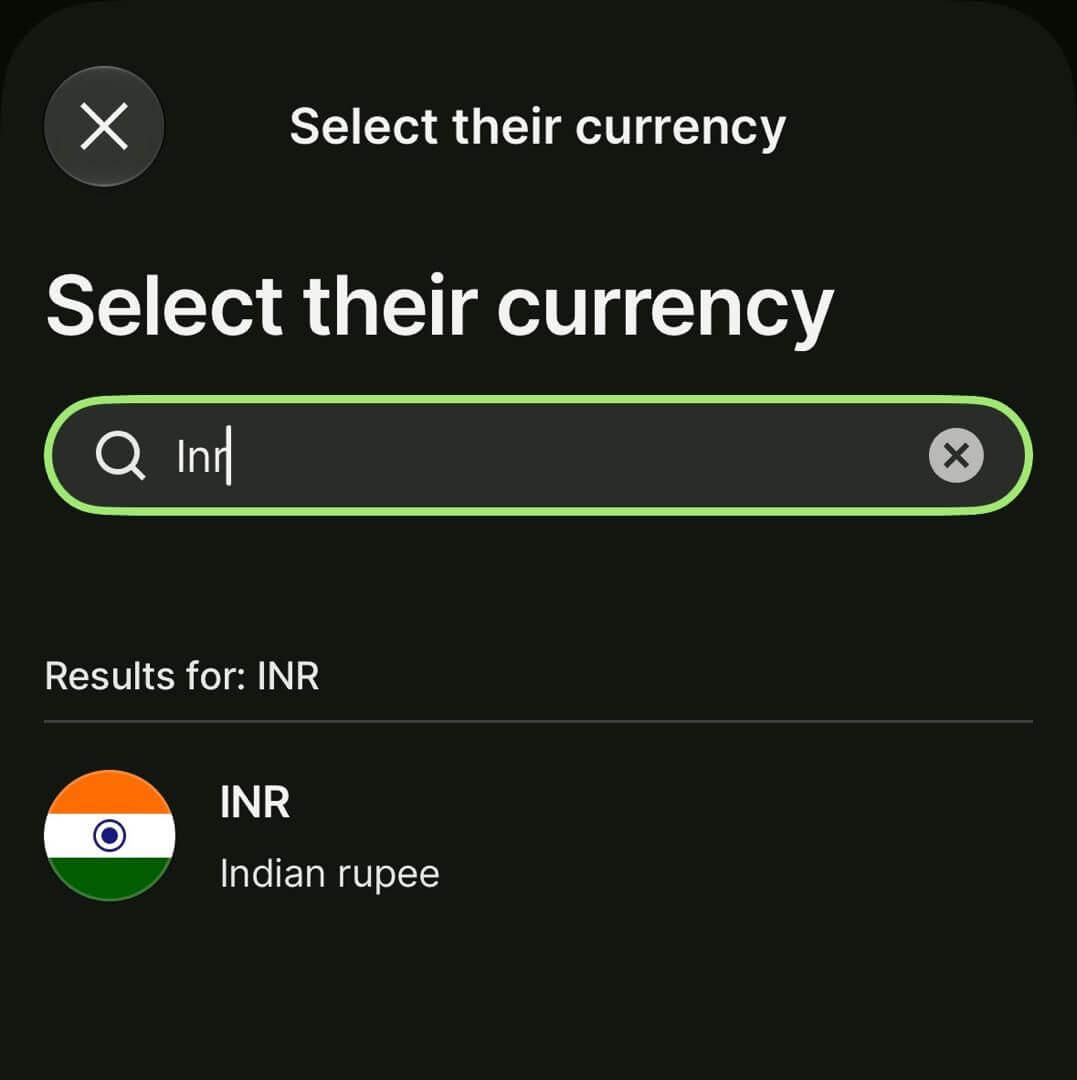
Wise first asks for the currency your recipient will receive. Search for INR and select Indian rupee, since Safari Acacia's account is held in India.
Choose Business as the Recipient
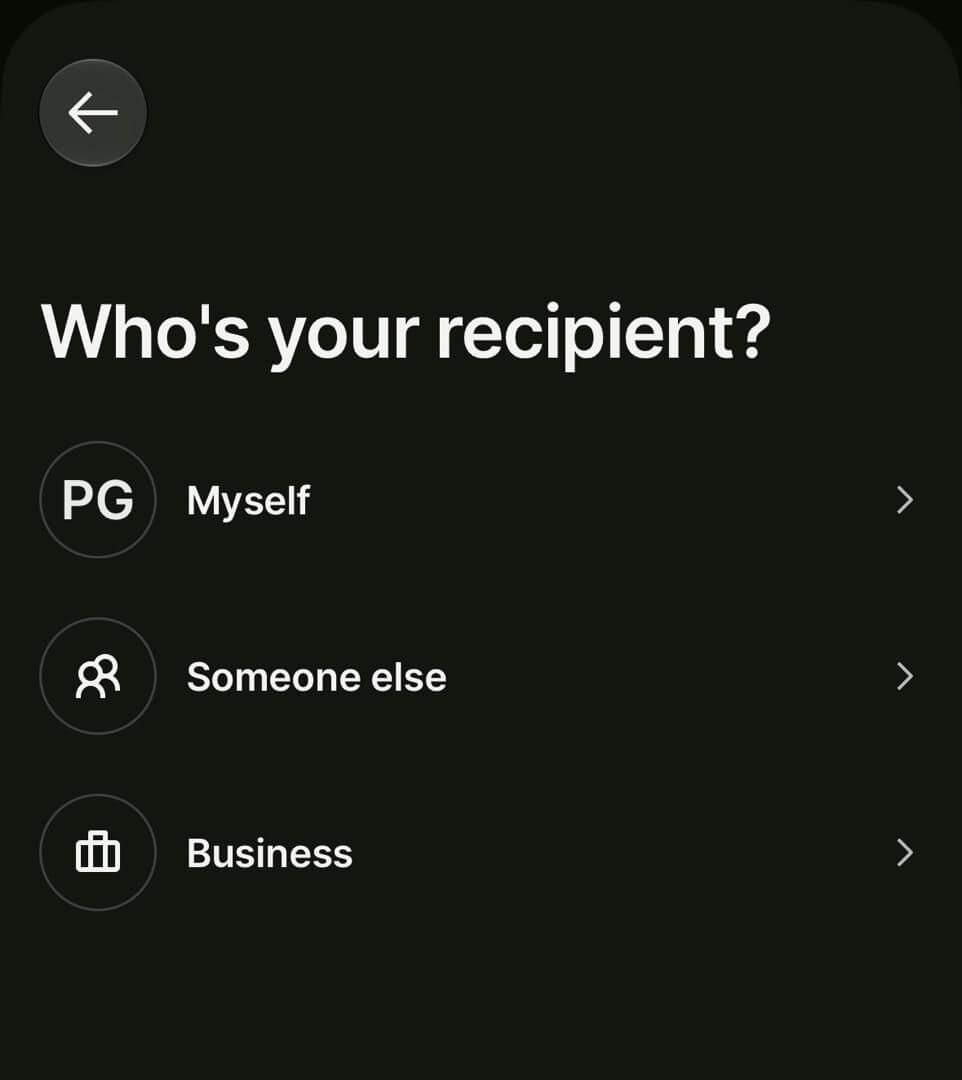
On the "Who's your recipient?" screen, choose Business. Safari Acacia Travel Agency is a registered business, so this is the correct option, rather than Myself or Someone else.
Select Bank Details
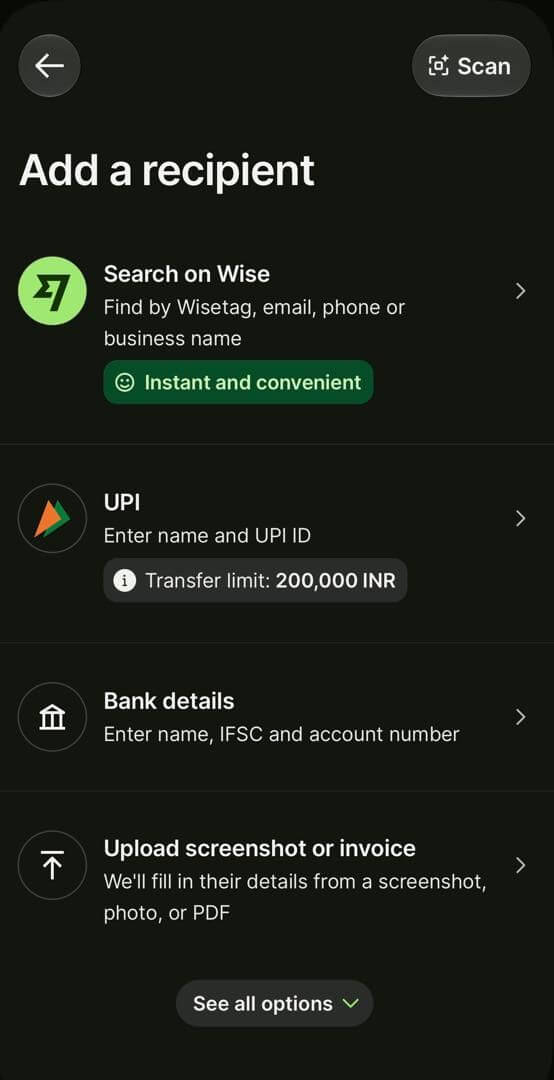
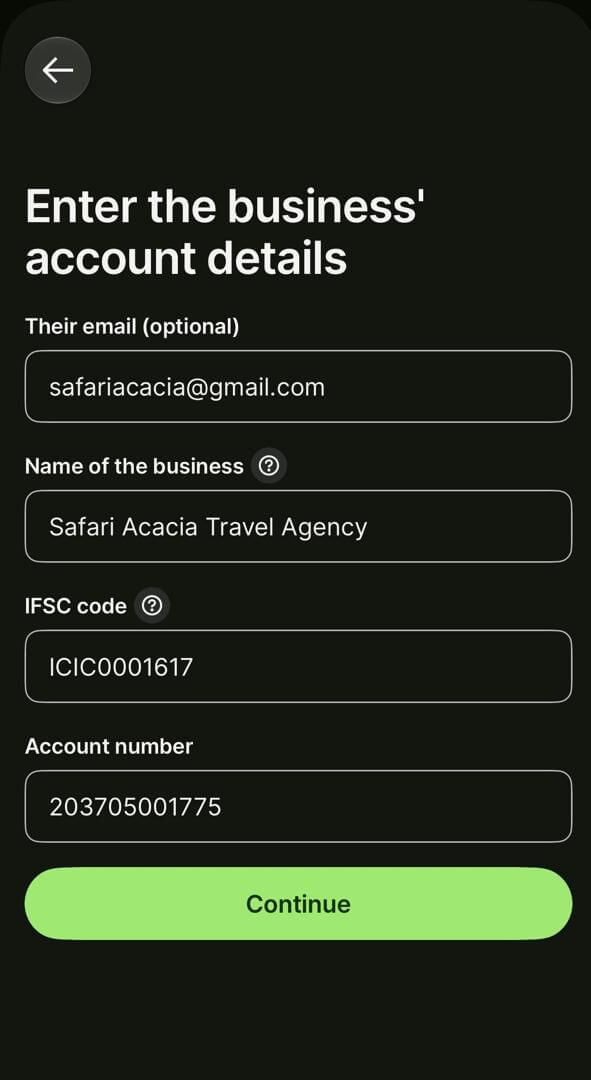
Wise offers a few ways to add a recipient. Select Bank details, which asks for the business name, IFSC code and account number exactly as they appear on your invoice.
Enter Safari Acacia's Business Account Details
Enter the business details in the fields below, exactly as they appear on your invoice. Double check every character before continuing. A single digit out of place can delay your payment or send it to the wrong account.
Once saved, Wise will offer Safari Acacia as a recipient automatically for any future payments.
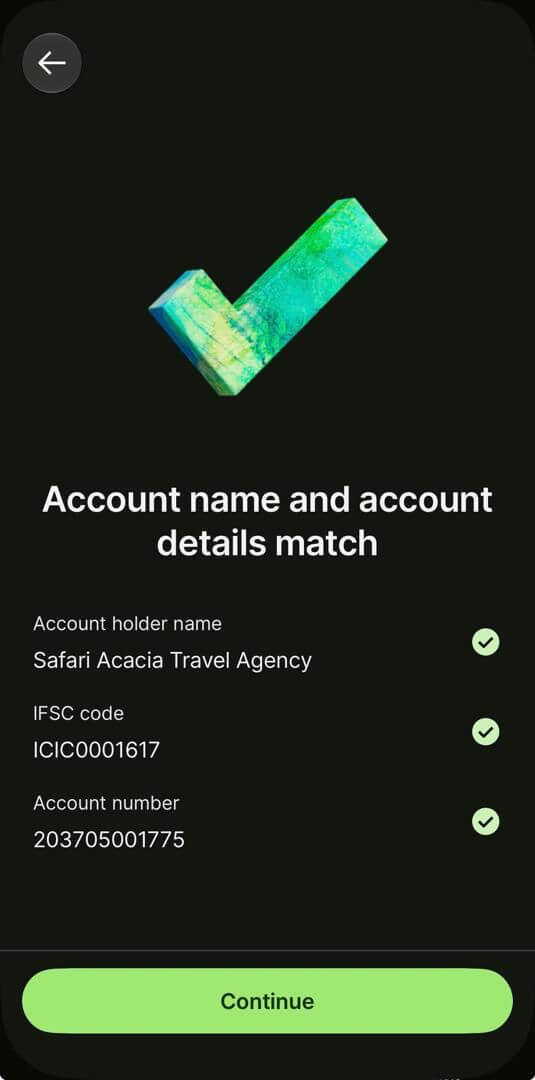
Confirm the Account Details Match
Wise checks what you entered and shows "Account name and account details match", with a green tick beside the account holder name, IFSC code and account number. If Wise shows anything other than a match, do not continue. Recheck the details against your invoice, or contact us before sending.
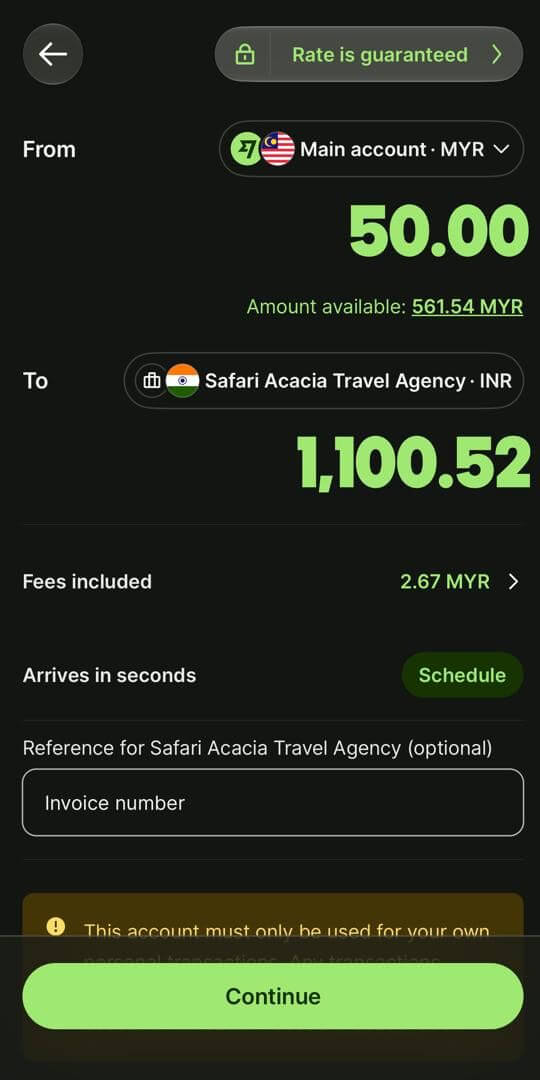
Enter the Amount and Your Invoice Number
Choose the account you are paying from and enter the amount from your invoice. Wise lets you set either the amount you send or the exact amount Safari Acacia receives in rupees, useful if your invoice states the figure we must end up with after fees. The screen shows the guaranteed exchange rate, the fees included, and when the money should arrive.
In the optional reference box for Safari Acacia Travel Agency, enter your invoice number. This is how we match your payment to your booking.
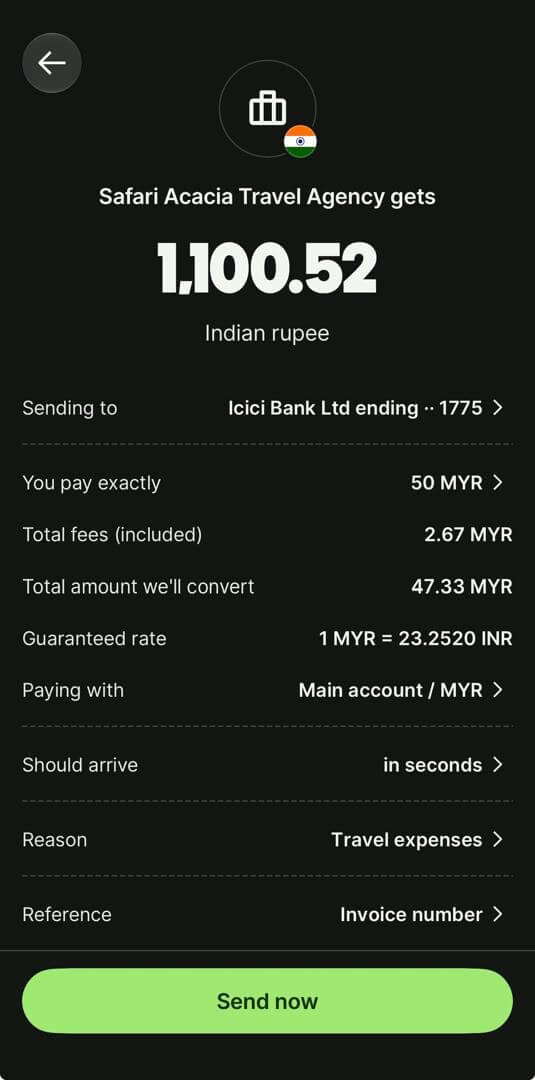
Review, Choose the Reason, and Send
Wise shows a final summary: the amount Safari Acacia Travel Agency gets in Indian rupees, the bank you are sending to, the exact amount you pay, total fees, the guaranteed rate, the account you are paying with, and when it should arrive. Check that the bank and the last digits of the account match your invoice.
Select Travel expenses as the reason, and confirm your invoice number appears as the reference. Once everything matches, tap Send now.
Track and Confirm
Wise will show the transfer's live status in the app. Once it has been sent, email the transfer reference, or a screenshot of your confirmation, to info@safariacacia.com along with your invoice number, so we can match it to your booking straight away.
Transfer Times & Costs
Arrival time depends on how you fund the transfer rather than a single fixed window. Wise shows the estimated arrival time on the amount and review screens before you send. A transfer paid from your Wise balance can arrive within seconds, while a bank debit is usually the cheapest option but can take a little longer, up to 1 to 2 working days once the payment has cleared, excluding weekends and public holidays.
Wise's fee is a low fixed charge plus a small percentage of the amount sent, typically well under what a traditional bank charges for the same transfer, and there is no subscription plan to upgrade for a better rate, every sender is shown the same pricing. The exchange rate itself is always the real mid market rate, with the full fee breakdown shown before you confirm anything.
Wise Payments
Questions we are asked first
Setting Up & Security
Do I need to verify my identity to use Wise?
Yes. Wise is a regulated financial institution and requires identity verification before you can send a transfer of any size. You provide a government issued ID, and verification can take anywhere from a few minutes to around a day.
Is my money secure with Wise?
Wise is a regulated payments institution that safeguards customer funds separately from its own operating money, and every transfer can be tracked in the app from the moment it is sent until it arrives.
Do I need a Wise account to receive money, or does Safari Acacia?
No. Safari Acacia receives your payment directly into its regular bank account, no Wise account is needed on the receiving end.
Sending Your Payment
What exchange rate will I get?
Wise applies the real mid market exchange rate, the same rate you would see quoted independently, with no markup. The fee is shown separately and in full before you confirm, so you always know exactly what Safari Acacia will receive.
Does my payment method change the fee?
Yes. A bank debit is usually the cheapest way to fund a transfer, while paying from your Wise balance or by card tends to arrive faster. Wise shows the fee and the estimated arrival time before you send.
Why is Wise asking me for a reason for the transfer?
Wise asks for a short reason for the payment on the review screen as part of standard regulatory checks. Select Travel expenses, which fits a holiday deposit or balance. This is normal and does not usually delay the transfer.
Need Help
For questions about your Wise account, a specific transfer, or fees, the in app help within Wise is available at any time. For questions about your booking, payment schedule or invoice, contact us directly and we will help clarify the details.